
Services - Service Areas - Support
| Call 310-470-2320 / 800-882-2046 Text 310-208-9316 Email Us Now |
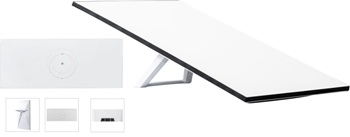
Professional Starlink Gen 3 and Gen 4 installation guide covering mounting options, Wi-Fi router setup, cable routing, performance optimization, and best installation practices.
GET A QUOTE & BOOK YOUR INSTALLATION
* Updated antenna design
* Improved router
* Better Wi-Fi coverage
* Ethernet capability
* Lower latency
* Higher throughput
Starlink continues to evolve with each new hardware generation, delivering faster performance, improved reliability, enhanced Wi-Fi capabilities, and simplified installation. The introduction of Starlink Gen 3 and the latest Starlink hardware represents a significant advancement in satellite internet technology, providing homeowners, businesses, remote workers, and enterprise users with a more capable and flexible networking solution. Although the equipment is designed for self-installation, achieving maximum performance requires careful planning, proper antenna placement, professional mounting, and optimized network configuration.
Unlike traditional satellite internet systems that rely on geostationary satellites positioned approximately 22,000 miles above Earth, Starlink operates through a rapidly expanding constellation of Low Earth Orbit (LEO) satellites orbiting at approximately 340 to 750 miles. This shorter communication distance significantly reduces latency while providing high-speed broadband connectivity capable of supporting video conferencing, cloud applications, online gaming, streaming media, remote learning, and modern business operations.
One of the most important aspects of a successful Gen 3 or Gen 4 installation is selecting the optimal antenna location. Starlink antennas require a wide, unobstructed view of the sky to maintain continuous communication with multiple satellites as they pass overhead. Obstructions such as mature trees, neighboring buildings, chimneys, rooftop equipment, utility poles, and surrounding terrain can interrupt satellite visibility and cause temporary signal interruptions. A professional site evaluation identifies the location that offers the greatest sky visibility while maintaining structural integrity, accessibility, and long-term reliability.
The latest Starlink hardware provides greater installation flexibility through improved mounting compatibility and enhanced equipment design. Depending on the building structure and surrounding environment, installations may utilize roof mounts, wall mounts, pole mounts, eave mounts, fascia mounts, non-penetrating roof mounts, or custom-engineered mounting solutions. Selecting the appropriate mounting system depends on roof construction, wind exposure, accessibility, maintenance requirements, and potential future expansion.
Structural integrity remains a critical component of every installation. The mounting system must support the antenna under changing environmental conditions including wind, rain, temperature fluctuations, and seasonal weather. Professional installation techniques utilize corrosion-resistant hardware, engineered brackets, weatherproof flashing, and proper fastening methods designed to provide long-term durability while protecting the building envelope.
Modern Starlink routers supplied with the latest hardware generations incorporate improved Wi-Fi performance, simplified network management, and expanded coverage capabilities. Proper router placement inside the building is equally important as antenna placement outdoors. Installing the router near the center of the coverage area reduces dead zones and improves wireless performance throughout the property. Larger homes, offices, warehouses, and multi-story buildings often benefit from mesh Wi-Fi systems, wired access points, or professionally designed network extensions to provide seamless connectivity throughout the entire facility.
Cable management is another essential element of a professional installation. The communication cable connecting the antenna and router carries both power and network data, making proper routing essential for long-term reliability. Professional installers carefully protect the cable from ultraviolet exposure, physical damage, moisture intrusion, rodents, and excessive bending. Exterior cable runs are often installed inside UV-resistant conduit, while wall penetrations are sealed using weatherproof materials that help preserve the integrity of the building envelope.
Electrical considerations also play an important role in protecting Starlink equipment. While the system is designed for outdoor operation, surge protection, proper grounding practices, and quality electrical infrastructure help safeguard network equipment from power disturbances and environmental conditions. Commercial installations frequently incorporate uninterruptible power supplies (UPS), managed network switches, enterprise Wi-Fi systems, and backup internet solutions to improve overall network availability.
Once the installation is complete, comprehensive testing verifies that every component operates correctly. This process includes obstruction analysis, firmware updates, antenna initialization, router configuration, Wi-Fi validation, speed testing, latency evaluation, and network optimization. The objective is not simply to establish an internet connection but to maximize system performance under real-world operating conditions.
The latest Starlink hardware also integrates easily into existing residential and commercial networks. Professional installers can configure Ethernet connectivity, managed switches, enterprise firewalls, mesh Wi-Fi systems, wireless bridges, security cameras, VoIP phone systems, network storage devices, and smart home technologies to create a complete communications infrastructure that extends well beyond basic internet access.
As satellite technology continues to advance, properly installed Gen 3 and future-generation Starlink systems provide a scalable platform capable of supporting increasing bandwidth demands, expanding connected devices, and evolving networking requirements. Investing in professional installation ensures that every component—from antenna placement and mounting hardware to cable management and network configuration—is designed to deliver reliable performance for years to come.
Whether the system is installed at a residence, commercial office, industrial facility, educational campus, healthcare clinic, agricultural operation, construction project, or remote location, the quality of the installation directly influences overall network performance. Careful planning, precision workmanship, and adherence to industry best practices help transform advanced satellite hardware into a dependable broadband solution capable of supporting today's most demanding internet applications.
FAQ
**Can I upgrade from an older Starlink system to Gen 3?**
**Does Gen 3 require a different mount?**
**Can I reuse my existing cable?**
**Should I use Mesh Wi-Fi?**
**Can Gen 3 connect to Ethernet?**
**How long does installation take?**
Router Placement Best Practices
* Avoid closets
* Central location
* Multi-story homes
* Metal buildings
* Concrete walls
* Mesh networking
Common Installation Mistakes
Include:
* Installing near trees
* Poor roof location
* Loose mounting hardware
* Improper router placement
* Exposed cable
* Unsupported pole
* No obstruction survey
* Ignoring firmware updates
* Starlink Roof Installation
* Starlink Pole Mount Installation
* Starlink Mini Installation
* Starlink Gen 3 - 4 Installation
* Starlink Business Installation
* Starlink for Construction Sites
* Starlink for Farms and Ranches
* Starlink for RVs and Mobile Homes
* Starlink for Boats and Marinas
* Starlink Wi-Fi Optimization
* Starlink Ethernet Adapter Setup
* Starlink Cable Routing
* Starlink Relocation Service
* Starlink Troubleshooting
Free Consult & Estimate
Call 310-470-2320 / 800-882-2046 Text 310-208-9316
Email Us Now install@StarLinklosangeles.com
FREE CONSULT & ESTIMATE
Get Quote & Schedule Best StarLink Internet Satellite Dish Installation Services by Our Certified StarLink Installers in all Southern CA cities, from N. Santa Barbara to San Diego, Palm Spring & Los Angeles for Businesses, Homes, RVs, Mobile Homes and Boats Call 310-470-2320 - StarLinkLosAngeles.com
Professional Starlink Gen 3 and Gen 4 installation guide covering mounting options, Wi-Fi router setup, cable routing, performance optimization, and best installation practices.
|